

Write Your Very First ChatGPT Prompt and Get a Genuinely Useful Output
The exact structure to use, with 3 real examples you can copy right now
SEO Blog Article | Drafted for How-To.com
New to Chat?
If you are new to ChatGPT, your first prompt can feel awkward. You type a sentence, hit enter, and hope the answer is useful. Sometimes it is. Often, it is too broad, too generic, or not quite what you meant. The good news is that you do not need to “learn AI” before getting value from it. You only need a better structure.
A strong ChatGPT prompt is simply a clear set of instructions. Think of it like briefing a smart assistant. The more clearly you explain the job, the audience, the desired format, and the limits, the better the first draft will be.
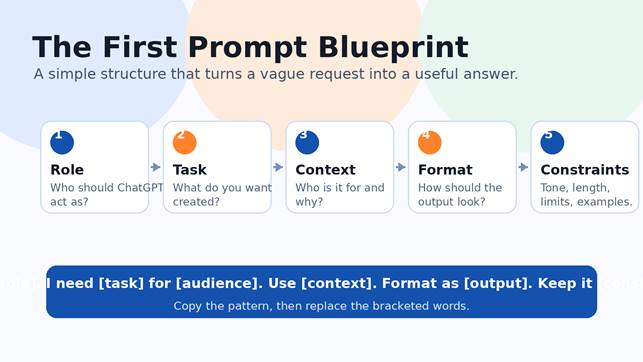
The exact structure: Act as [role]. I need [task] for [audience/context]. Use these details: [details]. Format it as [format]. Keep it [tone, length, and constraints]. Ask me up to [number] questions if anything important is missing.
That is the entire beginner prompt formula. It works because it removes guesswork. Instead of asking, “Write a blog post,” you tell ChatGPT what kind of expert to be, what outcome you want, who the output is for, and how the answer should look.
Here is why each piece matters. The role gives ChatGPT a point of view, such as “act as a marketing strategist” or “act as a patient tutor.” The task tells it exactly what to create. The audience and context keep the answer relevant. The format prevents messy output. The constraints control length, tone, reading level, and style. The final line, asking for clarifying questions, helps when your request is missing details.
Compare the difference. A weak prompt says: “Help me market my business.” A stronger prompt says: “Act as a small-business marketing strategist. I run a local landscaping company and need a 30-day social media plan for homeowners within 20 miles. Format it as a weekly calendar with post ideas, captions, and calls to action. Keep the tone friendly and practical.” The second prompt gives ChatGPT enough direction to produce something you can actually use.
Before you send your first ChatGPT prompt, ask yourself five quick questions: Who should the AI act as? What do I want created? Who is this for? What details should it know? What format do I want back? Answer those, and you will get a much better result than a vague one-line request.
The goal is not to write a perfect prompt. The goal is to write a useful first prompt, review the answer, then improve it with follow-up instructions like “make it shorter,” “add examples,” “use a warmer tone,” or “turn this into a checklist.” ChatGPT works best as a conversation, not a one-shot search box.
Start with the structure below, copy one of the examples, and replace the details with your own. Your first useful ChatGPT output is usually one clear prompt away.
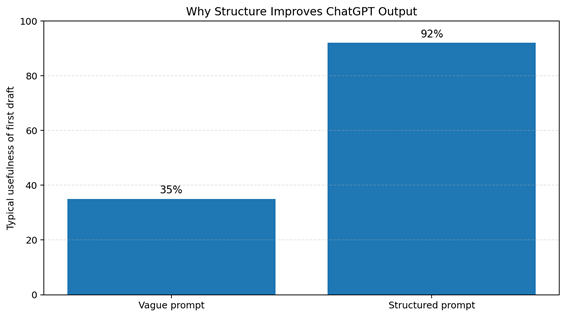
Graphic: A structured prompt usually produces a more useful first draft because it gives the AI role, context, format, and constraints.
3 Real ChatGPT Prompt Examples You Can Copy Right Now
1. Business email prompt
| Act as a concise business writing coach. I need a polite follow-up email for a client who has not responded to my proposal in seven days. The audience is a busy small-business owner. Use a friendly, professional tone. Format it as a short email with a subject line, greeting, body, and clear next step. Keep it under 150 words. |
2. Marketing plan prompt
| Act as a small-business marketing strategist. I run a local home-service company and need a simple 30-day marketing plan to attract new customers. Use low-cost ideas that work on Facebook, Instagram, Google Business Profile, and email. Format the output as a weekly calendar with tasks, post ideas, and calls to action. Keep the language practical and beginner-friendly. |
3. Learning prompt
| Act as a patient tutor. Teach me the basics of ChatGPT prompts for business work. Assume I am a beginner. Explain the concept in plain English, then give me a five-step practice exercise. Format the answer with headings, bullets, and one example prompt I can edit. Keep it clear, encouraging, and under 500 words. |
Beginner Prompt Checklist
- Give ChatGPT a role: “Act as a…”
- State the exact task: “I need…”
- Add audience and context: “This is for…”
- Specify the output format: email, table, checklist, plan, script, outline.
- Set limits: length, tone, reading level, examples, do/don’t rules.
- Improve with follow-ups instead of starting over.
| Next step: Save the prompt formula and use it every time you ask ChatGPT to create, explain, summarize, plan, or rewrite something for your work. |