
Setting Up ChatGPT for Work
The right account setup, settings, and starting configuration for professional use
How-To.com Business AI Guide
| SEO Title | Setting Up ChatGPT for Work: Free vs Paid, Settings, and Professional Setup |
| Meta Description | Learn how to set up ChatGPT for professional work, choose the right account, configure privacy settings, and decide whether Free, Plus, Pro, or Business is right for you. |
| Suggested URL Slug | /setting-up-chatgpt-for-work/ |
| Target Keywords | ChatGPT for work, ChatGPT setup, ChatGPT settings, ChatGPT Free vs paid, ChatGPT Business, AI productivity tools, professional AI workflow |
Article
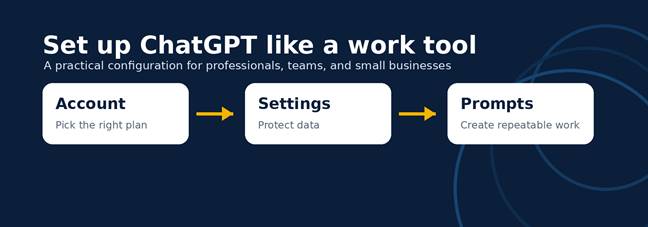
ChatGPT can become a serious work tool, but only if you set it up like one. Most professionals make the same mistake: they open a free account, type one vague question, and judge the answer. A better approach is to configure the account first, then give ChatGPT a clear role, rules, and repeatable workflows.
Start with the account decision. The Free plan is fine for learning, quick brainstorming, and testing simple prompts. It is not the best choice for daily professional use because access, uploads, memory, research, and speed are limited. If you use ChatGPT several times per week for writing, planning, spreadsheet review, meeting prep, marketing copy, or customer messages, ChatGPT Plus is usually the practical starting point. Plus gives an individual professional stronger access, faster responses, file uploads and analysis, image tools, deep research where available, Projects, tasks, and custom GPTs.
Pro is for people who depend on AI for heavier, more complex work: coding, research, long documents, demanding analysis, and repeated advanced workflows. If ChatGPT saves you several billable hours per month, the paid plan is easier to justify. If your company has multiple users, client data, shared knowledge, or compliance concerns, skip shared personal logins and look at ChatGPT Business. Business provides a dedicated workspace, admin controls, member and billing management, stronger security options such as SSO and MFA, and no training on your business data.
Next, configure your settings. Go to Settings and review Data Controls. For professional work, turn off model-improvement training if your use involves client notes, internal strategy, drafts, or proprietary ideas. Then open Personalization. Add custom instructions that describe your role, audience, preferred tone, formatting style, and default rules. Example: “Write in plain English for busy business professionals. Use short sections, practical examples, and clear next steps. Ask only when required.”
Memory can be helpful, but use it deliberately. Save durable preferences such as your brand voice, industry, formatting standards, or recurring project details. Do not save sensitive client information, confidential financials, private health details, passwords, or legal strategy. For one-off sensitive conversations, use a temporary chat and paste only the minimum context needed.
Finally, create a starting workflow. Set up Projects for recurring work such as marketing, finance, operations, research, or content creation. Add important background files only when appropriate. Keep a “starter prompt” that says what you want, who it is for, what good output looks like, and what constraints matter. The best ChatGPT setup is not about having the most expensive plan. It is about choosing the right level of access, protecting your data, and teaching the tool how your work should be done.
| Best rule: use Free to learn, Plus to work, Pro to push limits, and Business when a team needs control. |
Visual Guide: Free vs Paid
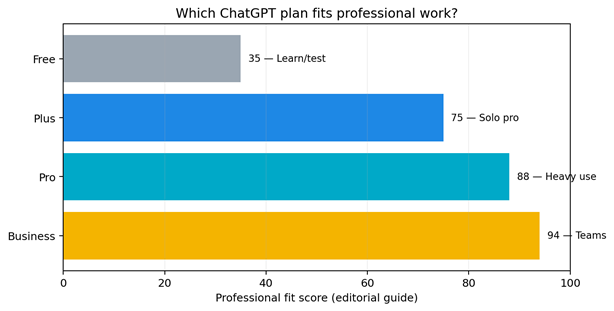
Note: The score is an editorial guide based on practical professional fit, not an official OpenAI rating.
Quick Decision Table
| Plan | Best For | Professional Setup Advice |
| Free | Learning and light testing | Use for practice, not confidential work. |
| Plus | Solo professionals and regular business use | Best starting paid tier for most individuals. |
| Pro | Heavy research, coding, analysis, and advanced workflows | Upgrade when usage limits slow real work. |
| Business | Teams, shared knowledge, client work, and admin control | Use for organizations; do not share personal logins. |
Publish-Ready SEO Notes
• Recommended H1: Setting Up ChatGPT for Work
• Recommended H2s: Account Setup, Settings, Free vs Paid, Starting Configuration
• Internal links to add on How-To.com: first ChatGPT prompt guide, beginner mistakes article, ChatGPT for business resources
• Call to action: Download the free ChatGPT setup checklist or watch the companion video at How-To.com.
Sources Checked
• OpenAI Help Center: What is ChatGPT Plus?
• OpenAI Help Center: About ChatGPT Pro tiers
• OpenAI Help Center: What is ChatGPT Business?
• OpenAI Help Center: Data Controls FAQ