
Research and Document Summarization, the Basics with ChatGPT
How to turn long documents, reports, PDFs, and research notes into useful decisions faster
| SEO Title | Research and Document Summarization with ChatGPT: A Beginner’s Guide |
| Meta Description | Learn how to use ChatGPT to summarize documents, organize research, compare sources, and create useful business-ready summaries. |
| Target Keywords | ChatGPT document summarization, AI research assistant, summarize PDFs, AI for business, research with ChatGPT |
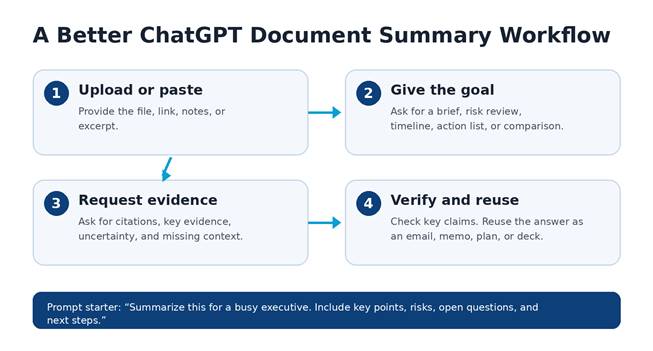
Original How-To.com workflow graphic: use ChatGPT as a guided research assistant, not just a shortcut.
Why summarization matters
Professionals are drowning in information: PDFs, meeting notes, contracts, market reports, email threads, policies, and research papers. ChatGPT can help turn that pile of documents into something useful: a clear summary, a list of decisions, a risk review, or a simple explanation you can share with a team.
The biggest mistake beginners make is asking, “Summarize this,” and stopping there. That usually produces a generic recap. Better results come from treating ChatGPT like a research assistant. Tell it who the summary is for, what decision you need to make, what format you want, and what details must not be missed.
Start with a specific outcome
Before you upload a file or paste text, decide what you need from the document. Do you want a one-page executive brief? A bullet-point summary? A comparison of two sources? A list of contradictions? A client-friendly explanation? The outcome changes the answer.
A strong prompt might say: “Review this report for a small business owner. Summarize the main findings in plain English, identify the top three risks, list any assumptions, and end with five recommended actions.” This tells ChatGPT the audience, purpose, format, and level of detail.
Use ChatGPT for research, not blind trust
ChatGPT can summarize uploaded documents, organize notes, analyze tables, and help explain complicated material. It can also miss context, misunderstand a chart, or overstate a conclusion. For important work, ask it to show where each major point came from. Have it separate facts from assumptions. Ask, “What information is missing?” and “What should I verify before relying on this?”
This is especially helpful for long PDFs, legal language, technical manuals, financial reports, and academic articles. You can ask ChatGPT to create a glossary, extract deadlines, find recurring themes, or convert dense paragraphs into a plain-English brief.
Best beginner prompt
Use this copy-and-paste prompt: “Act as a professional research assistant. Summarize the attached document for a busy decision-maker. Include: 1) a 100-word overview, 2) the five most important points, 3) risks or red flags, 4) important dates, names, or numbers, 5) questions I should ask next, and 6) a short action plan.”
For even better results, ask for a second pass: “Now challenge the summary. What might be wrong, incomplete, biased, or unsupported?” This step turns a basic summary into a smarter review.
The bottom line
ChatGPT is most valuable when it helps you read faster, think clearer, and communicate better. It should not replace your judgment. Use it to compress information, surface patterns, and prepare better questions. When you combine a clear prompt with careful verification, document summarization becomes one of the fastest ways to save time and improve business decisions.
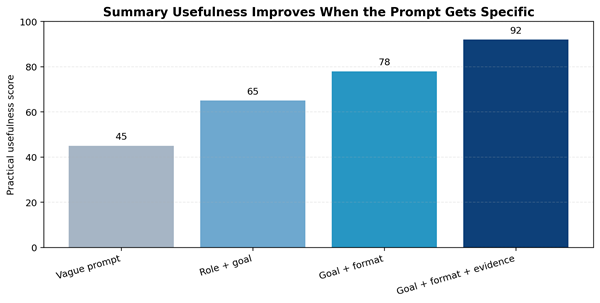
Prompt specificity is the easiest way to improve ChatGPT summaries. Chart is illustrative for training purposes.
| Want more practical AI tutorials? Visit How-To.com and learn how to use ChatGPT for real business work. |
Sources and Further Reading
OpenAI Help Center: File Uploads FAQ – https://help.openai.com/en/articles/8555545-file-uploads-faq
OpenAI Help Center: Data analysis with ChatGPT – https://help.openai.com/en/articles/8437071-data-analysis-with-chatgpt
OpenAI Help Center: Deep research in ChatGPT – https://help.openai.com/en/articles/10500283-deep-research-in-chatgpt
OpenAI Help Center: Projects in ChatGPT – https://help.openai.com/en/articles/10169521-projects-in-chatgpt