
Writing Emails and Proposals, the Basics with ChatGPT
A practical, plain-English guide for professionals who want clearer drafts, faster replies, and stronger client proposals.
| SEO title: How to Use ChatGPT to Write Better Emails and Business Proposals | Keywords: ChatGPT for business writing, AI email writing, proposal writing with ChatGPT, professional emails with AI |
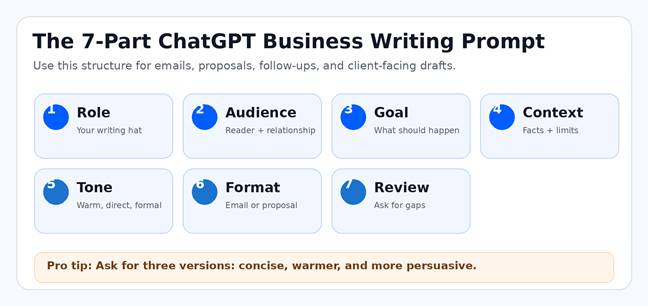
Figure 1. A simple prompt structure for better business writing with ChatGPT.
Why this matters
Email and proposal writing are no longer just administrative tasks. They shape how clients judge your professionalism, how quickly projects move, and whether a prospect says yes. ChatGPT can help, but only if you treat it like a writing partner, not a magic button. The goal is not to let AI sound impressive. The goal is to help you communicate clearly, quickly, and persuasively.
Start with the job, not the tool
Before opening ChatGPT, write one sentence that describes the outcome you want. Do you need a short follow-up email, a polite reminder, a proposal outline, or a complete first draft? The clearer the job, the better the answer. A weak prompt says, “Write me an email.” A useful prompt says, “Write a friendly follow-up email to a potential client who reviewed our proposal last week. Ask whether they have questions and suggest a 15-minute call on Thursday.”
The basic email workflow
For emails, give ChatGPT the recipient, the relationship, the purpose, the key facts, and the tone. Then ask for multiple versions. For example: “Act as a professional business writer. Draft three versions of a concise email to a client: one warm, one direct, and one more persuasive. Keep each under 125 words.” This approach gives you choices instead of forcing you to accept the first draft.
The basic proposal workflow
For proposals, start with structure. Ask ChatGPT to create an outline before it writes the full document. A strong business proposal usually includes an executive summary, the client’s problem, your recommended solution, deliverables, timeline, pricing, proof of credibility, and next steps. Once the outline looks right, feed ChatGPT your notes and ask it to turn them into a polished draft.
Make revisions in layers
Do not ask ChatGPT to fix everything at once. Revise in passes. First ask for clarity. Then ask for a stronger opening. Then ask it to remove repetition, shorten long sentences, and make the next step obvious. This keeps the draft controlled and helps you avoid the generic, over-polished AI voice that readers can spot quickly.
Use ChatGPT to improve, not replace, judgment
The most important step is review. ChatGPT can make confident mistakes, miss context, or choose a tone that feels too generic. Always verify names, dates, pricing, legal language, guarantees, and client-specific details. If the email matters, read it out loud. If the proposal involves money or commitments, have a human review it before sending.
A simple prompt you can copy
Use this starter prompt: “Act as a senior business writer. I need to write a [type of document] for [audience]. The goal is [desired outcome]. Here are the facts: [paste notes]. Use a [tone] tone. Keep it clear, professional, and easy to scan. Ask me any questions if information is missing.”
Bottom line
ChatGPT is best at defeating the blank page. It can organize messy notes, create a first draft, adjust tone, shorten long paragraphs, and turn rough ideas into a professional message. You still bring the judgment, facts, and relationship knowledge. Used well, ChatGPT helps you write emails and proposals that are faster to create, easier to read, and more likely to move the conversation forward.
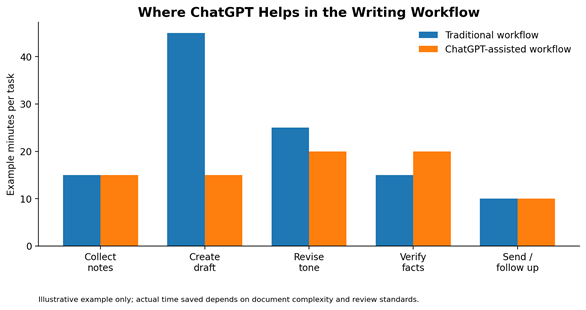
Figure 2. Example comparison of a traditional writing workflow versus a ChatGPT-assisted workflow.
Copy-and-Paste Prompt Examples
| Use case | Prompt |
| Client follow-up | Draft a warm follow-up email after a proposal meeting. Keep it under 125 words and end with a clear next step. |
| Shorten an email | Rewrite this email to be 40% shorter while keeping the tone professional and friendly: [paste email]. |
| Proposal outline | Create a business proposal outline for [client] based on these notes: [paste notes]. Include executive summary, scope, timeline, pricing, and next steps. |
| Tone revision | Make this draft sound more confident, less salesy, and easier to scan. Keep the meaning the same: [paste draft]. |
Professional Use Note
For work use, follow your company policy before pasting confidential client data, pricing, contracts, or private employee information into any AI tool. OpenAI describes ChatGPT Business as a team workspace plan and ChatGPT Enterprise as a managed organization plan with privacy, security, and admin controls. Review the current plan details before choosing a setup for your company.
Further reading: OpenAI: What is ChatGPT Business? | OpenAI: What is ChatGPT Enterprise?
Approximate article word count: 492 words. Suggested URL slug: /writing-emails-proposals-chatgpt-basics