
 | HOW-TO.COM BLOG GUIDE Plain-English AI skills for business productivity |
Meeting Preparation and Follow-Ups Using ChatGPT
A practical How-To.com guide for better agendas, clearer decisions, and faster post-meeting action.
| SEO Title | Meeting Preparation and Follow-Ups Using ChatGPT: A Practical Business Guide |
| Meta Description | Learn how to use ChatGPT for meeting preparation, agendas, summaries, action items, and follow-up emails so every business meeting produces clearer decisions. |
| Target Keywords | ChatGPT for meetings, AI meeting preparation, meeting follow-up emails, AI agenda builder, business productivity, ChatGPT prompts, action items, meeting summaries |
Why meetings need a better workflow
Meetings are supposed to move work forward. Too often, they do the opposite. People arrive without context, the discussion wanders, decisions disappear into memory, and follow-up emails get delayed until the momentum is gone. ChatGPT can help turn meetings from time drains into organized decision engines – but only when you use it before, during, and after the conversation.
The first use is meeting preparation. Before a client call, team check-in, sales review, or project meeting, paste in the purpose of the meeting, the audience, key background facts, and the outcome you want. Ask ChatGPT to create a tight agenda, predict likely questions, identify risks, and suggest the best order of discussion. This simple step helps you enter the room with a clear plan instead of a loose list of topics.
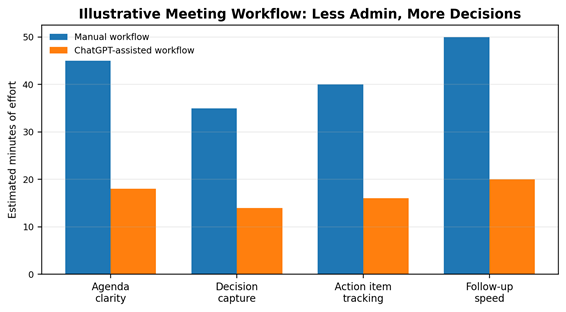
Figure: Illustrative example only – actual time savings vary by meeting type and workflow.
For example, a strong prompt might be: “Act as my chief of staff. Build a 30-minute agenda for a marketing strategy meeting. The goal is to choose three priorities for the next quarter. Include discussion questions, decision points, and what information I should bring.” That prompt gives ChatGPT a role, a time limit, a goal, and a useful output format. The result is usually far better than asking, “Make me an agenda.”
ChatGPT is also useful for meeting research. You can ask it to summarize background documents you provide, convert notes into talking points, or create a briefing sheet for each attendee. If you are meeting with a customer, vendor, investor, or department head, ChatGPT can help you prepare smarter questions and avoid wasting the first ten minutes getting oriented.
| Prompt to Try: Copy-and-paste prompt: Act as my executive assistant. Using the notes below, create a meeting summary with five sections: 1) purpose, 2) key discussion points, 3) decisions made, 4) action items with owners and deadlines, and 5) a concise follow-up email I can send to attendees. Keep the tone professional and clear. |
After the meeting, ChatGPT becomes even more valuable. Paste in rough notes, a transcript, or bullet points and ask for a summary organized by decisions, open questions, owners, deadlines, and next steps. You can then ask it to draft a follow-up email that is concise, professional, and action-oriented. This is where the time savings compound: instead of trying to remember what happened, you turn messy notes into a clean record of accountability.
The best follow-ups are specific. Ask ChatGPT to separate confirmed decisions from proposed ideas. Ask it to flag unclear ownership. Ask it to turn vague phrases like “circle back soon” into real next actions, such as “send revised pricing by Friday at 3 p.m.” AI does not replace judgment, but it does force structure onto the conversation.
To use ChatGPT safely at work, avoid pasting confidential customer data, private financial details, passwords, legal secrets, or sensitive employee information unless your company account and policies allow it. Treat AI as a productivity assistant, not a private vault. Review every summary and follow-up before sending it.
The payoff is simple: better preparation, sharper conversations, faster follow-ups, and fewer dropped commitments. If your business holds meetings every week, learning how to use ChatGPT for agendas, summaries, action items, and follow-up emails is one of the easiest ways to improve productivity immediately.
Bottom line
Start with one repeatable workflow: prepare an agenda before the meeting, capture notes during the meeting, then use ChatGPT to produce decisions, action items, and a polished follow-up. For more practical AI guides, visit How-To.com.