

The 5 Beginner Mistakes to Avoid When Starting with ChatGPT
The most common errors professionals make with ChatGPT — and exactly how to avoid each one from the beginning.
| SEO Title | 5 Beginner ChatGPT Mistakes Professionals Should Avoid |
| Meta Description | Learn the five most common ChatGPT mistakes beginners make and how professionals can write better prompts, verify answers, and save time with AI. |
| Target Keywords | ChatGPT beginner mistakes, how to use ChatGPT, ChatGPT prompts for professionals, AI tools for business, ChatGPT tips |
ChatGPT can feel like magic the first time you use it. Type a question, press enter, and a polished answer appears. But professionals quickly discover a hard truth: the quality of the response depends on the quality of the prompt. Most beginner mistakes are not technical. They are communication mistakes. The good news is that once you know what to avoid, you can get clearer, faster, and more useful answers from the beginning.
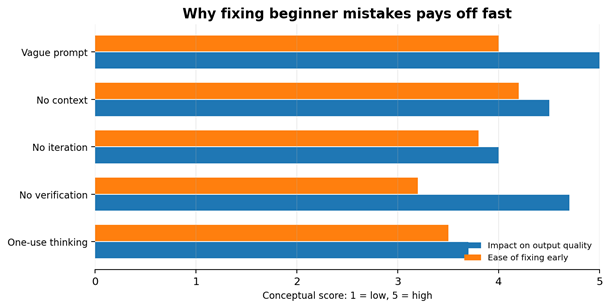
Conceptual guide: vague prompts and missing context usually create the biggest drop in output quality.
1. Asking vague questions
A beginner might write, ‘Help me with marketing.’ ChatGPT has to guess the audience, goal, tone, format, and next step. Instead, give a specific job. Say what you want, who it is for, and what good looks like. Better prompt: ‘Act as a marketing coach. Create a 7-day email plan for a local accounting firm that wants more small-business clients.’
2. Forgetting to add context
ChatGPT performs better when it understands the situation. Tell it your industry, audience, constraints, deadline, budget, and preferred style. A consultant, dentist, author, and restaurant owner should not receive the same answer. Context turns a generic response into practical advice.
3. Accepting the first answer
The first response is a draft, not the finish line. Ask ChatGPT to improve it. You can say, ‘Make this shorter,’ ‘Add examples,’ ‘Use a more professional tone,’ or ‘Rewrite this for a beginner.’ Professionals get better results because they treat ChatGPT like a collaborator, not a search box.
4. Failing to verify important information
ChatGPT can be useful and still be wrong. It may miss recent changes, misunderstand facts, or sound confident about weak information. For legal, financial, health, technical, or business-critical decisions, verify the answer with trusted sources before acting on it.
5. Using ChatGPT only for writing
Many beginners stop at emails and blog posts. That leaves most of the value on the table. ChatGPT can also brainstorm ideas, compare options, build checklists, summarize meetings, create training materials, draft procedures, and turn messy notes into action plans.
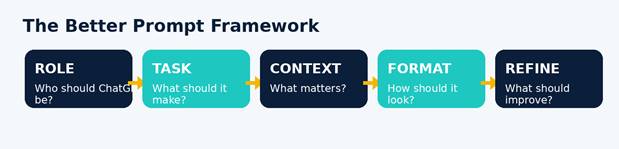
| Copy-and-paste starter prompt: Act as [role]. I need [specific output] for [audience]. My goal is [goal]. Use [tone/style]. Format it as [format]. Ask me up to three questions if anything is missing. |
The easiest way to improve your ChatGPT results is to slow down at the start. Give the tool a role, a goal, context, a format, and permission to refine. Do that, and ChatGPT becomes more than a novelty. It becomes a practical assistant for everyday professional work.
Learn more practical AI workflows at How-To.com